dota2弹出steam client not found解决方法 steam client not found是什么怎么解决
关键字:dota2弹出steam client not found解决方法 steam client not found是什么怎么解决
|
dota2游戏中相信很多玩家都不知道出现steam client not found怎么办吧,今天小编就来给大家讲解一下出现steam client not found的解决方法,相信一定可以帮到大家。 玩dota2出现steam client not found怎么办? steam client not found 出现的原因
很多玩家在出现了这个问题之后用了所有方法都不行,都不能解决。后来,有技术宅机智的发现了出现 steam client not found 原因,原来出现这个问题是因为 steam 的数字签名过期了。 dota2 出现 steam client not found 问题的解决方法
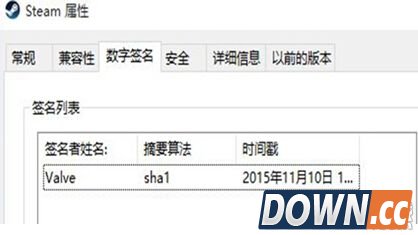
1、首先,删除 steam 文件夹内的 package 文件夹(看下自己安装的 steam 在哪一个磁盘下,打开 steam 文件夹就可以看到 package 文件夹) 2、启动 steam,steam 会出现自动的更新,steam 更新会持续下载,玩家不要动它 3、更新完毕之后,右键点击 「steam」 - 「属性」 - 「数字签名」,如图中所示,签名的时间之前是 2015 年 8 月的,现在签名时间变成了 11 月的,就可以啦,问题解决。 以上就是游戏中出现steam client not found的解决方法,相信一定可以帮到不知道出现steam client not found怎么办的玩家。 |

推荐新闻


小编推荐软件专题
推荐内容
- 网易云音乐倍数播放在哪开 倍数播放功能设置方法(2022-03-06 10:46:28)
- 抖音云相册功能怎么关闭 云相册功能关闭步骤介绍(2022-03-02 09:50:53)
- 华为太空液晶表盘怎么买 gt2手表功能价格介绍(2022-02-20 10:29:44)
- 英伟达两种驱动应该下载哪个 英伟达驱动介绍(2022-02-07 16:16:38)
- 哈利波特魔法觉醒魔咒稀有度调整了什么内容 魔咒稀有度调整内容介绍(2022-01-21 09:43:38)
- 冰点文库不能用了怎么办 不能用了解决方法(2022-01-15 10:02:10)
- 少女前线偏振光第五章逃逸加速度怎么玩 偏振光第五章逃逸加速玩法介绍(2021-09-24 14:06:45)
- 哈利波特巧克力蛙npc9.22在哪里 巧克力蛙npc9.22位置介绍(2021-09-23 09:14:38)
- 孙美琪疑案周静王奶奶在哪里 周静王奶奶具体位置介绍(2021-09-18 17:37:44)
- 哈利波特魔法觉醒魔法史答题是什么 魔法史答案分享(2021-09-08 17:02:28)
相关内容
热点内容


