ios8.3越狱后如何删除apple watch应用 ios8.3越狱后删除apple watch应用教程
|
ios8.3完美越狱后删除apple watch应用教程来啦!ios8.2加入的watch应用,由于不能删除,让不少用户很无奈,现在只要ios8.3完美越狱后就可以删除apple watch应用了,一起去看看教程吧!
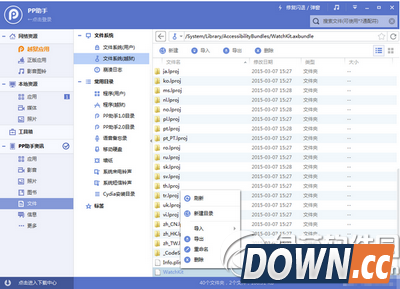
ios8.3完美越狱后删除apple watch应用教程 一、先把设备进行ios8.3完美越狱。 二、连接PP助手等同步工具,进入文件系统(越狱),开始删除文件: 1、Apple Watch /Applications/Bridge.app /private/var/mobile/Library/SpringBoard/PushStore/com.apple.Bridge.pushstore /System/Library/AccessibilityBundles/Bridge.axbundle /private/var/mobile/Library/Preferences/com.apple.Bridge.plist /System/Library/AccessibilityBundles/WatchKit.axbundle /System/Library/Frameworks/WatchKit.framework /System/Library/LocationBundles/AppleWatchFaces.bundle /System/Library/PrivateFrameworks/BridgePreferences.framework
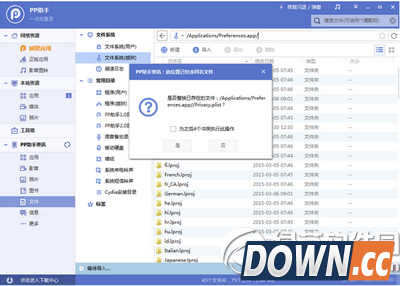
2、Facebook /Applications/SocialUIService.app/PlugIns/com.apple.social.FacebookComposeService.appex /Applications/FacebookAccountMigrationDialog.app /System/Library/AccessibilityBundles/FacebookSettings.axbundle /System/Library/PreferenceBundles/FacebookSettings.bundle /System/Library/Accounts/Authentication/FacebookAuthenticationPlugin.bundle /System/Library/Accounts/Access/FacebookAccessPlugin.bundle /System/Library/Frameworks/Social.framework/XPCServices/com.apple.facebook.xpc 3、Flickr /Applications/SocialUIService.app/PlugIns/com.apple.social.FlickrComposeService.appex /System/Library/PreferenceBundles/FlickrSettings.bundle /System/Library/Accounts/Authentication/FlickrAuthenticationPlugin.bundle /System/Library/Frameworks/Social.framework/XPCServices/com.apple.flickr.xpc /System/Library/PrivateFrameworks/VUSocialUpload.framework 4、Vimeo /Applications/SocialUIService.app/PlugIns/com.apple.social.VimeoComposeService.appex /System/Library/PreferenceBundles/VimeoSettings.bundle /System/Library/Accounts/Authentication/VimeoAuthenticationPlugin.bundle /System/Library/Frameworks/Social.framework/XPCServices/com.apple.vimeo.xpc /System/Library/PrivateFrameworks/VUSocialUpload.framework 5、iBooks /Applications/iBooks.app /Applications/Setup.app/AppleIDiBooks@2x.png /System/Library/SyncBundles/Books.syncBundle /var/mobile/Media/Books 6、Podcasts /Applications/Podcasts.app /private/var/mobile/Library/SpringBoard/PushStore/com.apple.podcasts.pushstore /System/Library/AccessibilityBundles/Podcasts.axbundle /System/Library/Assistant/Plugins/Podcasts.assistantBundle 7、Tips /Applications/Tips.app /etc/asl/com.apple.tips /etc/asl/com.apple.tipsd /private/var/mobile/Library/Preferences/com.apple.tipsd.plist /System/Library/AccessibilityBundles/Tips.axbundle /System/Library/LaunchDaemons/com.apple.tipsd.plist 或/Library/LaunchDaemons/com.apple.tipsd.plist /System/Library/PrivateFrameworks/Tips.framework /usr/libexec/tipsd 8、Twitter /Applications/SocialUIService.app/PlugIns/com.apple.social.TwitterComposeService.appex /System/Library/AccessibilityBundles/TwitterFramework.axbundle /System/Library/AccessibilityBundles/TwitterSettings.axbundle /System/Library/Frameworks/Twitter.framework /System/Library/PreferenceBundles/TwitterSettings.bundle /System/Library/Accounts/Authentication/TwitterAuthenticationPlugin.bundle /System/Library/Frameworks/Social.framework/XPCServices/com.apple.twitter.xpc /System/Library/PrivateFrameworks/MobileSync.framework/ 三、下载删除数组文件(点击这里下载),解压并替换至【/Applications/Preferences.app/】路径中,这么做是因为在设置里面有些地方会出现上述软件,删除跟上面软件有关的数组就没问题了。
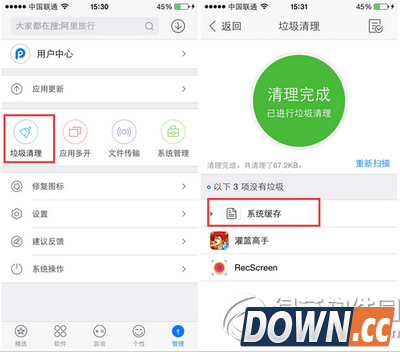
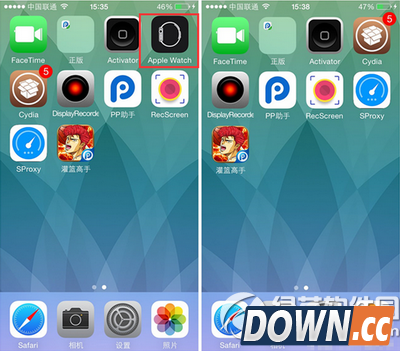
四、完成以上操作之后清理手机缓存,然后重启手机即可发现Watch应用等都不见了!
|

推荐新闻


小编推荐软件专题
- 幻塔驱散异兽活动怎么玩 驱散异兽活动玩法介绍(2022-02-08 13:47:13)
- 明日方舟将进酒商店怎么选择 将进酒商店高性价比兑换方法(2022-02-06 15:39:26)
- 原神哪些角色比较强 角色强度排行榜介绍(2022-01-18 13:55:03)
- 和平精英奥特曼动作怎么获得 奥特曼动作获取方法(2021-12-14 16:07:05)
- 猎人手游中战斗舞者刷图连招 猎人战斗舞者PVE怎么玩(2020-01-10 14:15:39)
- 王者荣耀S9程咬金最佳铭文搭配推荐(2017-10-18 11:01:36)
- win10打开acrobat发现菜单栏不见了怎么办(2017-09-15 10:20:10)
- 阴阳师第二季广播剧配音大赛开启(2017-06-06 13:10:53)
- bilibili会员积分怎么得 b站刷会员积分方法(2016-11-11 09:34:47)
- 微信买单怎么用 微信买单怎么开通方法介绍(2016-10-08 09:11:23)


